SAP Cloud solutions quickly in SAP PI
SAP Cloud solutions can be efficiently connected and integrated through SAP Process Integration (PI) and the PI Connectivity Add-on. This allows both cloud-based services and on-premise applications to work together and exchange data seamlessly.
Here's a brief guide on how these components can be connected:
Install SAP PI and PI Connectivity: Firstly, your organization needs to have SAP PI in place. It serves as the integration platform where all data exchange and communication take place. Then, install the PI Connectivity Add-on which is specifically designed to support the seamless integration of SAP PI with cloud solutions.
Configure the system: Administer the system parameters in line with your business requirements. Make sure that you've created the necessary configuration objects like communication channels, inbound and outbound interfaces etc.
Define Connection: As the next step, define a communication/connectivity channel in SAP PI. The communication channel is needed to facilitate communication between your cloud solution and the SAP PI system. You will be prompted to enter various details such as the type of adapter you want to use, the message protocol, target URL etc.
Set up Security: It is advised to set up SSL/TLS encrypted communication for ensuring secure message exchange between SAP PI and your SAP cloud solutions. Remember to import the SSL certificates into the keystore of your SAP PI system.
Monitor and Test: After setting up, it's important to monitor and test. In SAP PI, you can monitor all communications and data exchange via the monitoring tools provided. Regular testing will also ensure that the system is working as expected.
Remember that precise steps can vary based on the specific cloud solution and version of SAP PI that you are connecting. It is advisable to refer to SAP's official technical documentation or seek assistance from a certified SAP consultant or support.
Also, please note SAP PI has been succeeded by SAP Process Orchestration (PO) and SAP Cloud Platform Integration. These provide more updated integration features in line with the current technology trends.
Even though SAP CPI is the standard cloud integration tool offered by SAP for connecting cloud solutions like SAP Commerce Cloud and SAP Cloud for Customer, SAP now also offers an alternative for SAP PI on-premise customers with the standard Connectivity Add-on toolkit. This toolkit allows you to use the oData interface definitions in PI flow modeling.
The Connectivity Add-on can be downloaded and installed on SAP PI.
The Connectivity Add-on offers OData adapter metadata and ESR integration content which allows the CRUD operations towards SAP Cloud for Customer elegantly.
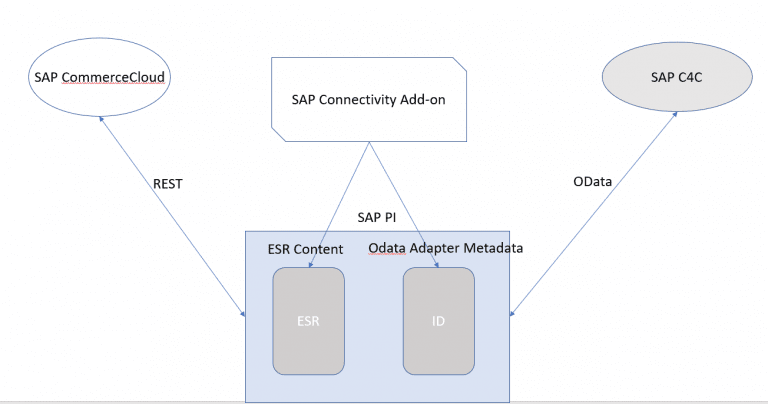
In our case, the integration and orchestration was aimed at SAP Cloud for Customer from SAP Commerce Cloud where it needed multiple lookup calls towards SAP Cloud for Customer to search for accounts and associated contacts and further proceed to a patch/post of a contact.
Once deployed, the solution consists of an Operation Mapping (OM), a Message Mapping UDF, an ICO Object and oData Channels.
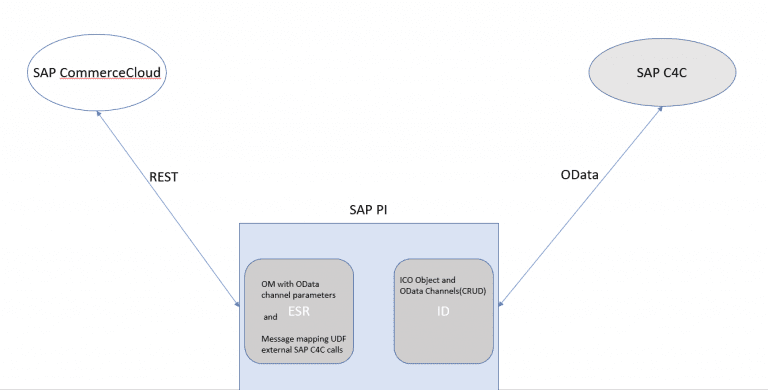
To avoid the cumbersome performance of the ccBPM, com.sap.aii.mapping.lookup.LookupService class is leveraged to communicate with SAP Cloud for Customer via OData channels passed as parameters to the Operation mapping.


Comments
Post a Comment